---
title: "How do I find my Bitly OAuth access token?"
url: "https://alex.zappa.dev/blog/how-do-i-find-my-bitly-oauth-access-token/"
description: "Learn how to sign up for a Bitly account and generate an access token for the Bitly API. Follow these steps to get started."
---

# How do I find my Bitly OAuth access token?

January 19, 2019

*   [#bitly](/tags/bitly/),
*   [#oauth](/tags/oauth/),
*   [#access token](/tags/access-token/)

Do you have Bitly account? If not [signup](https://bitly.com/a/sign_up) right now.

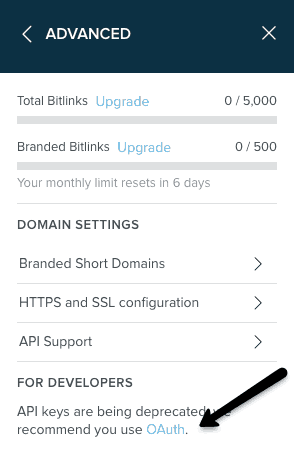
If you are looking for start using the Bitly API, you will need your Oauth Access Token. To find your OAuth access token navigate to the hamburger menu button in the top right-hand corner. From the drop down select ‘Settings’ and then continue to the ‘Advanced Settings’ tab. Look to the bottom under ‘For Developers’ and click on the OAuth hyperlink.
![Bitly OAuth Access Token](/_astro/api-key-with-arrow.M9BVK8hd_16zGlu.webp)

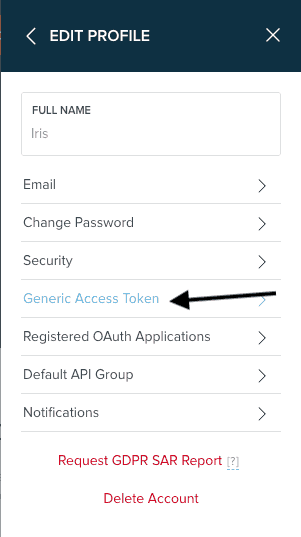
If you need to generate an access token so you can use our API, you can go to [https://bitly.com/a/oauth\_apps](https://bitly.com/a/oauth_apps), click “Generic Access Token”,

![Bitly Edit Profile Generic Access Token](/_astro/bitly-edit-profile-generic-access-token.D7kleGyG_2iNmjP.webp)

Then enter your password to create the token, and then copy that token into your code or configuration.

Access tokens don’t expire (though you can expire them manually if yours leaks into the wild), so you can use the single access token as long as you need.

May the 4th be with you,  
Alex

*   [PreviousCampaign URL Builder Introducing the Shortcodes](/blog/campaign-url-builder-introducing-the-shortcodes/)
*   [NextHow remove .DS\_Store files from a Git repository?](/blog/how-remove-dsstore-files-from-a-git-repository/)