How I replaced my ISP router and extracted PPPoE credentials using a bridge sniffer
I use Digi España with their standard ZTE H3600 router, but ISP-provided hardware is always limited. You can't properly configure VPN, firewall, or DNS. What I really wanted was full control over my network.
That's why I chose GL.iNet. Their routers run OpenWRT, which is essentially a well-optimized Linux distribution. I can SSH into the terminal and configure everything through standard Linux config files. That level of control simply isn't possible with ISP hardware.
For a long time, I was using this setup:
ONT → Digi Router → Google Wifi Mesh (Router Mode)
Later I replaced the Google Wifi with TP-Link Deco X60 WiFi 6 Mesh routers. And I wouldn't have touched this whole setup if it weren't for TP-Link's greed. 😤
Imagine this: three years ago you buy a very expensive product advertised as having a firewall, advanced filtering rules, ad blocking, and many other features. Then one sunny Spanish day, you get a firmware update. I'm one of those people who gets excited about new firmware and eagerly installs it. 🤩 My excitement ended the moment I discovered that part of my router's functionality was now behind a paywall! 🤯 They added a subscription wall to built-in features of my router!
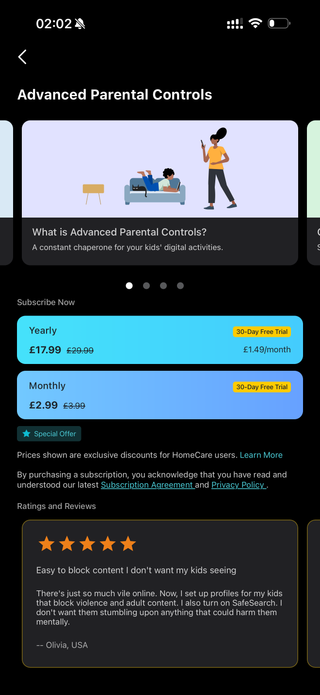
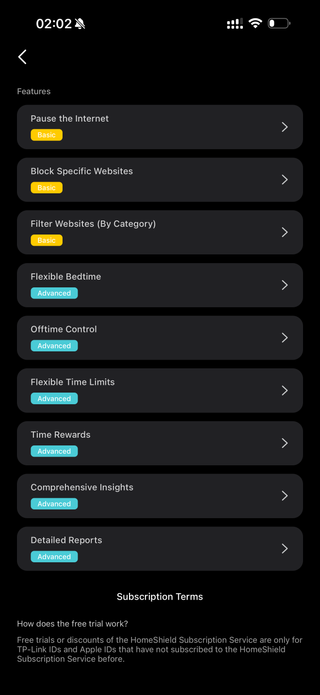
This isn't even a cloud service. This is hardware I bought! It reminds me of BMW's heated seat subscription or Mercedes' audio system paywall. Funny, right? 😂 But facts are facts. I was shocked 😱 and decided it was time to replace the router with something more advanced and open in terms of settings and functionality.
So I thought: why not replace it with my travel router for testing? Would it handle the load? I was surprised. Yes, it actually does, except for some dead zones in the apartment where the walls seem to be shielded somehow.
In the end, I decided to keep the TP-Link units but switched them from router mode to access point mode, essentially giving the middle finger to all their subscriptions. 😎
Two TP-Link units spread across different points in my apartment more than cover the entire area, delivering up to 900 Mbps over WiFi 6 with stable, lag-free internet.
Because my network topology had become overly complex, I thought: why not remove the Digi router entirely and connect my travel router directly to the ONT? That's when I remembered I didn't know the PPPoE login and password. I could have just opened a support ticket with Digi. They provide credentials without any issues. But where's the fun in that? 😄 I decided to go the hacker route and capture them myself for the experience and entertainment. 🕵️
The problem: hidden credentials # Anchor link
The first thing I tried was the ZTE web interface. The PPPoE password is hidden. Actually, it's not even there! I tried extracting it through DevTools, but the interface is JavaScript-based without direct URLs. Analyzing dashboard requests didn't reveal any vulnerabilities either.
Attempting to connect via SSH on port 22 failed. The port was closed or the daemon wasn't running.
I also tried various login combinations for advanced settings:
admin/ password from the router stickerfactorymode/Zte521- Hidden URLs like
192.168.1.1/manager_dev_config_t.gch
Nothing worked. The Digi firmware is well locked down and likely stripped, with all settings including PPPoE login and password baked into the firmware.
Then I remembered: PPPoE authentication is transmitted unencrypted. Time to sniff some packets. 😏
The solution: bridge sniffer # Anchor link
The idea is simple: place a computer between the ONT and router, pass traffic through transparently, and listen to the PPPoE handshake. PAP credentials are transmitted in plain text.
What you need # Anchor link
- Any computer with Linux (even a live USB works)
- Two Ethernet ports (built-in + USB adapter)
- Your new router
- ~30 minutes of time
In my case, I used a Mele Quieter 4C mini PC with Pop!_OS. I keep it around for testing apps on x86_64 since not everything runs smoothly in emulators on Apple Silicon. For the new router, I used my GL.iNet Beryl AX MT3000 travel router as a test. If it works out, I'll probably upgrade to a Flint 2.
Connection diagram # Anchor link
ONT → [eth0 Computer eth1] → ZTE Router
Installing packages # Anchor link
sudo apt update
sudo apt install bridge-utils tcpdump wireshark
Creating the bridge # Anchor link
# Find interface names
ip a

# Create bridge
sudo ip link add br0 type bridge
sudo ip link set enp1s0 master br0           # built-in ethernet
sudo ip link set enxc8a36235e23e master br0  # USB adapter (name will differ)
sudo ip link set enp1s0 up
sudo ip link set enxc8a36235e23e up
sudo ip link set br0 up
Capturing the handshake # Anchor link
The sequence matters here:
- Power off the ZTE router
- Connect cables through the bridge (ONT → computer → router)
- Start the sniffer:
sudo tcpdump -i br0 -vvvs 0 -w pppoe_capture.pcap- Power on the ZTE router
During boot, the router establishes a PPPoE session and sends credentials in plain text.
Analyzing captured data # Anchor link
Once the internet LED on the router lit up (indicating a successful connection), I stopped tcpdump (Ctrl+C) and analyzed the capture:
sudo tcpdump -r pppoe_capture.pcap -vvv | grep -iE "pap|chap|user|pass|name"The password appeared immediately in the output. 🎉
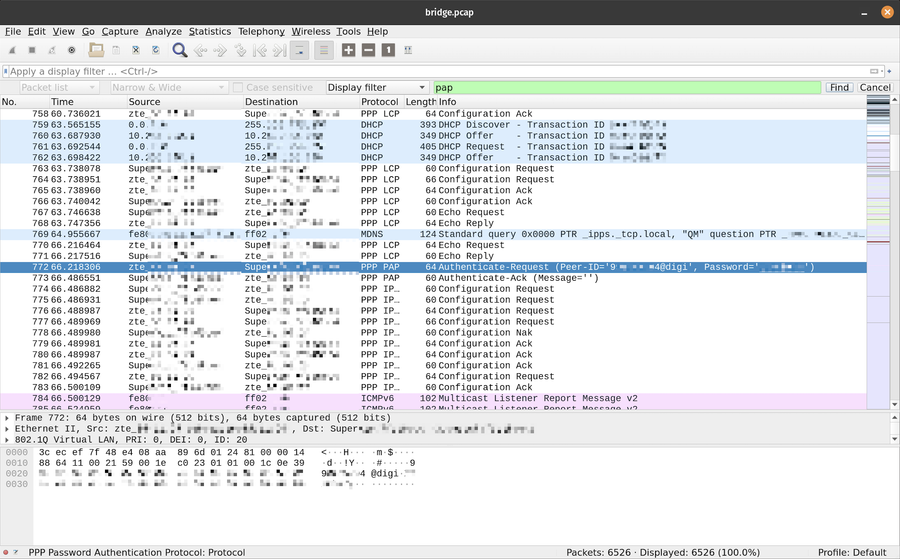
I was doing all this connected to a TV, so taking screenshots was inconvenient, but later I opened the capture in Wireshark and took a screenshot.
Open the capture in Wireshark with filter pap:
Result # Anchor link
In the logs, I found the PAP Authentication Request:
PAP, Auth-Req (0x01), id 1, Peer [USERNAME]@digi, Name [PASSWORD]
Important: PAP transmits credentials in plain text, which is why the capture works.
Configuring the new router # Anchor link
Parameters for GL.iNet (or any other) # Anchor link
| Parameter | Value |
|---|---|
| Protocol | PPPoE |
| Username | [captured username]@digi |
| Password | [captured password] |
| VLAN ID | 20 |
| MTU | 1500 |
| MAC Clone | MAC address of old router |
Important: VLAN 20 # Anchor link
Initially, the connection wouldn't establish. Logs showed "Timeout waiting for PADO packets". The problem was solved by adding VLAN ID 20 to the PPPoE settings.
MAC address # Anchor link
You can find the MAC on the ZTE sticker or in its web interface under WAN settings.
Troubleshooting # Anchor link
Timeout waiting for PADO packets # Anchor link
Cause: ONT isn't responding to PPPoE requests.
Solutions:
- Add VLAN ID 20
- Reboot the ONT (to reset the old session)
- Make sure the ZTE is completely disconnected
- Check cables and ports
MTU warning # Anchor link
The logs showed a warning about MTU 1492. Standard MTU for PPPoE is 1492, but Digi works with 1500 as well.
Alternative method: fake PPPoE server # Anchor link
If you don't have two Ethernet ports, you can set up a fake PPPoE server:
# Disconnect ONT from router
# Connect router directly to computer

sudo pppoe-server -I eth0 -L 10.0.0.1 -R 10.0.0.10 -N 1 -k -F
The router will try to connect to the "provider" and send credentials. However, this method is less reliable. Not all routers send credentials to a fake server.
Security hardening # Anchor link
After setting up my new router (or rather, verifying these settings):
- Disabled UPnP
- Enabled SYN flood protection
- Configured DNS over HTTPS (ControlD)
- Disabled remote access
- Installed GL.iNet beta firmware with improved security
Behind CGNAT (IP 100.x.x.x), you're not directly visible from the internet anyway, but extra protection never hurts.
Final network topology # Anchor link
My new setup is much simpler and more logical:
ONT → GL.iNet Beryl AX (PPPoE)
        ↓  ↓  ↓  ↓  ↓  ↓  ↓
TP-Link Deco X60 (AP Mode, WiFi roaming) 2 units connected via Ethernet backhaul
+ multiple Ethernet switches to various devices
Conclusion # Anchor link
The entire process took about an hour, including experimenting with settings. Now I have full control over my home network: proper firewall, VPN, AdGuard, and no ISP firmware limitations. 💪
This little adventure reminded me of my sysadmin days back in the early 2000s when we were learning how Linux actually works under the hood. That's when I first met Ubuntu. Later came Arch and Fedora. I'm pretty much OS-agnostic at this point, though Linux and macOS are my favorites. Mac is my daily driver for productivity, but Linux is where I go for fun, joy, and tinkering with my homelab. 🛠️ And yes, I use Arch btw. 🐧
TL;DR for Digi España # Anchor link
Connection Type: PPPoE
VLAN ID: 20
MTU: 1500
MAC: clone from original router
Disclaimer:
This article is for educational and entertainment purposes. It describes obtaining credentials for your own connection. Use this information responsibly.
May the 4th be with you,
Alex